Kayıtlar

Second Language Learning with Web 2.0 Platforms

Resim
 Language learning platforms can make language learning easier for a lot of people. Unlike traditional language courses, language learning platforms offer flexibility, lower costs and more interactive learning. Language learning platforms are great especially for beginners. People no longer have to read language books or attend expensive courses. With language learning platforms, learners can learn a new language whenever and wherever.  Various platforms for language learning can be listed. Here are some of them; 1-Duolingo Duolingo is a free language learning platform which offers 106 different courses in 38 languages. Duolingo adapts its lessons according to the learner, motivates them with virtual coins and gives learners immediate grading. Duolingo Duolingo Tutorial 2-Memrise Memrise is another free language learning platform which offers courses in 16 languages. With memrise, learners can learn new languages with videos of native speakers speaking in real-life situations....

Kahoot

Resim
Kahoot is a quiz platform which turns quizes into games. Kahoot can make quizes more fun and turn them into a stress-free activity for students. Kahoot is easy to use both for students and teachers. Students can join a kahoot that is shared with them or play kahoots from the discover page of kahoot. Kahoot quizes enhance learning by makng them more engaging, interesting and providing immediate feedback.  The image given above represents how kahoot will look like when played synchronously. The teacher's screen will have the question, image and each answer. This screen should be placed in a way that enables each student to see clearly. The small screens, representing students' devices, has the choice options.  Here are tutorials on kahoot; What is Kahoot? Guide to Kahoot

Pixton

Resim
 Pixton is a platform that enables students and teachers to create their own comics. With Pixton students can easily create their own comics where they display what they have learned. This creates a learner-centered environment where the learners can have fun while learning.  With Pixton, it is very easy to create a variety of materials or activities. As an example, here is a Pixton task I have created; As an answer to this, students can create their own comics where they can complete this task. Here is what a student comic would look like; Additionally, comics can be used by the teacher to demonstrate the topic of the lesson. For example, if our topic is ordering food, I can create a comic with a conversation of people ordering food. This can make the lesson more effective. Here are tutorials on how to use Pixton; How to use Pixton Pixton EDU: Intro for Educators

Web 2.0 Tools for Teaching

Resim
Web  2.0 tools can create opportunities for students to interact with the material rather than being the passive listener. When students engage in the lesson, what they learned will be long lasting. Additionally, anyone with a device that has access to internet can access numerous materials on the internet. The effectiveness of web 2.0 tools and their user-friendliness puts them into an important place for education. A lot of various tools can be found on the web. From the link below, you can find a few of the web 2.0 tools, how they work and why they should be used. Web 2.0 Tools for Teaching

Online Course Certificate from Udemy

Resim
Online courses are highly popular among people and there is a reason for that. The main advantage of online courses is their flexibility. You can take an online course whenever and wherever you want. Second, their costs are lower than face-to-face lessons since online courses do not have a physical space like a classroom to manage. Moreover, learners do not have additional costs such as transportation. Third, learners can control the learning pace. They can skip lessons if it is a topic they know, or re-watch them very easily. Also with online courses the options are unlimited. You can find any course about topics you are interested in. Here is the certificate of an online Japanese Course I have completed;

Social Networking as an Educational Tool

Resim
Social Networking is useful as an educational tool which makes education better, cheaper and more accessible. Social networking tools of web 2.0 enable the web to get better through the users adding new content, which in turn links other users. As they provide engagement, they become efficient for education. User generated content in education has some benefits and limitations. The benefits include users creating their own experiences, educational content being refreshed without needing an expert, improving skills of working in teams, learners getting motivated, users adding value to the concepts. Additionally, users can clarify concepts, form relationships and test themselves through social networks. The limitations include the lack of trust, reliability and believability. It also encourages short attention spans, leads to immediate answers and it is hard to find the necessary content. Nevertheless, the limitations and benefits of social networking cannot be separated. Millennials, ...

Trello

Resim
 Trello is a platform for organizing and keeping track of projects. With Trello, people of all backgrounds can work individually or together with a group in their projects, regardless of their relevance with education. Nevertheless, teachers and students can benefit from this platform as well. Trello can be used in a variety of ways for education.  Firstly, Trello can also be used for keeping track of anything related to the lesson. For example, teachers can get help from Trello when designing their lessons. They can keep track of their own progress, what step they are at and act accordingly. Additionally, students can note their own process when doing a project. Another example to keeping track of lesson related things can be seen in the picture provided above. It can be seen that this example was created to keep track of the skills of the students. Here, teachers can drag the name of a student to the skill that needs to be improved. This way, teachers can create small groups...

Nearpod

Resim
 Nearpod is a tool that is similar to Peardeck. Nearpod aims to make the lessons more engaging and student centered. For this purpose, teachers often create tasks and activities about their lessons. However, Nearpod provides more diverse options to teachers when compared to traditional education. Nearpod makes the presentations more interactive through the use of quizes, open ended questions, polls, interactive videos and many more. Although it is possible to create effective interactive tasks in a classroom environment, giving each student enough and equal time can be hard to manage. However, Nearpod allows students to engage in the lesson simultaneously, which means that each student would have equal opportunities to participate in the activities presented. Additionally, Nearpod makes the lesson more interesting which helps them pay attention to the topic. As students focus on the lesson, Nearpod guarantees a more effective lesson.  Here is a presentation example prepeared w...

Flipgrid

Resim
 Flipgrid is a platform which allows video discussing experience. Teachers create discussion prompts with a topic presented and students can reply with their videos. When it comes to the topic of these discussions, the options are unlimited. Teachers can ask their students to respond with videos about any topic they think is suitable to their lesson.  Here is an example of a discussion prompt created with Flipgrid; Flipgrid Material With this task, students record their videos and upload them to flipgrid. In this case, the task provides students to use the English Language in a communicative function. Students can talk about their past experiences however they like. Additionally, Flipgrid enables each student to participate in the provided task. In a classroom environment, there might not be enough time for everyone. However, with flipgrid each student can share their videos simultaneously. This also prevents the lesson from being limited with only the classroom. Students can ...

Edmodo

Resim
 Edmodo is a platform that is used for managing classroom. Teachers can upload documents and materials, create posts, make announcements and upload assignments. Edmodo also enables communication not only between the teacher and the students, but also among the students. Edmodo is a great platform to keep track of the classroom activities.  After signing up and creating a class, teachers can start with creating all sorts of materials. A welcome post is a great way to start. As can be seen from the picture, posts can be created through the boxed area. Gifs, images and files can also be attached to the created posts. The arrow in the photo points to a post example that I have created. Polls can also be created in the same place as the posts are created.  Teachers can also create assignments. Additionally, assignments can have documents and links attached to them. Through those links and documents attached, the given assignment can be made more clear for the students.

Voki

Resim
 Voki is a platform where students and teachers create their own personalized characters and give them a speech. This speech can either be their own voice or a computer voice. Voki creates a learning environment where students can have fun while learning.  Voki is a great tool to attract students' attention. As the avarage attention span of a student is 15 minutes, it is important to keep students engaged in the lesson. Voki can be used for this purpose. Students can create their own characters, add voices to them and watch each other's Voki videos. Additionally, students can work individually or together as a group. When working together with their classmates, the cooperative aspect to the activities is very beneficial for students to strangthen each other's weaknesses. Through this participation, students will focus on the lesson since Voki is an interesting tool to use in the classroom. This would also help students share new ideas and get involved in critical thinking. ...

Edpuzzle

Resim
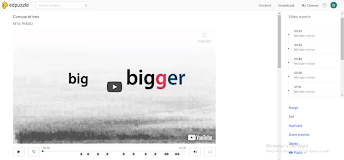
 Edpuzzle is a tool where teachers can assign videos with questions given for students to watch and answer the questions. This is a great tool for the improvement of listening and comprehension skills. Here is an example of a lesson material prepeared with Edpuzzle; Edpuzzle Material As can be seen from the picture, the video presented here has questions given. When the video is assigned to a lesson, the students' will watch and understand the material to be able to understand the questions. These videos can either be uploaded and created by the teacher or the teacher can use the videos with already prepeared questions. In the area outlined by a box, two types of questions can be seen. In Edpuzzle, the videos can include either open ended questions or multiple choice questions. Additionally, teachers can add some notes to videos.  In the place the first arrow points at, the teacher can assign the video to a class. In the place the second arrow points at, the teachers can edit ...

Padlet

Resim
Padlet is a tool that creates a virtual wall where the users can create posts and give feedback to each other's posts. Padlet creates a learning environment that is more interactive and student centered than a traditional learning environment. Additionally, it can easily make the lesson more interesting for the learners and thus, attracting their attention. Keeping students engaged and focused by attracting their attention makes sure that the information presented can be more long lasting. Therefore, using Padlet for activities can be very beneficial for the learners. Here is an example of how Padlet can be used for activities; Padlet Example With Padlet, it is possible to create different types of activities. However, in the example presented here, the aim is to create a Padlet space where students can introduce themselves. This type of a Padlet can be used at the beginning of a lesson with the aim of creating a space where students can get to know each other. The same self intro...

Jamboard

Resim
Jamboard is a very useful tool for online lessons. If the teacher needs a white board when he/she is explaining a topic, Jamboard is the way to go. Apart from working as a white board, with Jamboard students can also create posters and work together on them very easily, even when they are not together physically. Moreover, the projects can also be carried out asynchronously and synchronously. Here is an example of a student project created by Jamboard; https://jamboard.google.com/d/1-2IfnZ_SsMljCyVebS3FWFAJxdkw_eqzWPvPHHquXAU/edit?usp=sharing In the student project given as an example, students work in groups and describe the appearance of one person in their group. Even in an online lesson, students can easly create a poster and have an end product of what they practiced. Additionally, they can work together and help each other in choosing the correct words for this project.

Peardeck

Resim
 When teaching any subject, it is important for the lesson to be student centered. Student centered lessons encourage student participation and thus, make the learning process more effective. Nevertheless, sometimes teachers has to explain a topic and in such situations, the lesson can be more teacher centered. The main problem with teacher centered lessons is that the students may get bored and stop paying attention. This would result in them not acquiring the given information and it would damage the purpose of the lesson in the first place. In order to keep the students engaged in the lesson, using some additional tools such as peardeck can be crucial for the effectiveness of the lesson.  Peardeck is a tool that can be used to make the lesson more interactive for the students. In the lesson, the students can interact with the presentation and thus, participate in the lesson when the teacher is explaining a topic. An interactive lesson prepeared with peardeck would make the ...